 Blog
Blog
You cannot click safely on what you cannot see. Every phishing attack that disguises a link relies on the same blind spot: the words you read are not the address you visit. The display text says one thing; the href goes somewhere else entirely. By the time you would normally find out, you have already clicked. And it is not always a crude look-alike domain: often the link routes through a tracker or redirector, so where you actually land is nothing like the brand named in the text.
Hovering to inspect a URL helps, but it is voluntary, easy to skip, awkward on mobile, and — even when you do it — it asks you to read a long address and pick out the one part that matters. That is a lot to ask on every link, every day. Reveal URLs removes the effort: it makes the real destination visible by default, so the mismatch jumps out instead of hiding.
The link that looks right but isn't
Consider a real 2025 campaign against Booking.com. The email showed a link reading https://admin.booking.com/hotel/hoteladmin/… — exactly what a hotelier would expect. The address it actually pointed to was https://account.booking.comんdetailんrestric-access.www-account-booking.com/en/. The character between "com" and "detail" is not a slash: it is the Japanese hiragana ん (U+3093), which in many fonts renders almost identically to "/". The real registered domain is therefore www-account-booking.com — attacker-controlled — and everything to its left is just subdomain text dressed up to read like a path on booking.com.
This is the case Reveal URLs is built to defend against. Seeing the URL is necessary, but not always sufficient: you also have to recognise which part is the real registered domain. Reveal URLs puts the destination in front of you by default — printed above the link and flagged in red the moment the link's visible text itself contains a URL or host that differs from that real destination — so the mismatch does the work for you.
This is the client-side, practical answer to a problem we examined in depth earlier: why email authentication stops domain spoofing but not link-based phishing, and why the industry should always show the URL. For the full background, see Email link phishing: why your email app should always show the URL.
What Reveal URLs does
Reveal URLs compares the visible link text against the link's actual href and flags any mismatch. In your browser and in Thunderbird, for every link it prints the real destination directly above the link, prefixed with → , inside a thin box. When the link's visible text itself names a web address (a URL or host) whose site does not match that real destination, the box and its text turn red; otherwise — including when the text is just words, such as a "Go to payment" button — they stay a plain dark grey (the address is still shown, just not flagged). The warning you need is there by default, before you click — no hover, no long-press.
Take a worked example. A message contains a link whose text reads amazon.com, but whose href points at https://amaz0n-secure.com/signin (a zero in place of the "o", on a domain nobody at Amazon owns). With Reveal URLs the gap is unmissable: above the link sits → https://amaz0n-secure.com/signin in a red box, because the destination host amaz0n-secure.com does not match the amazon.com the text promises. You see the deception before you click, with no hovering and no guesswork.
On the web and in Thunderbird, the WebExtension prints the destination above each link as the page or message is rendered. In Outlook, the same analysis appears in a side panel. Either way, the destination is visible by default — never hidden behind a hover or a long-press.
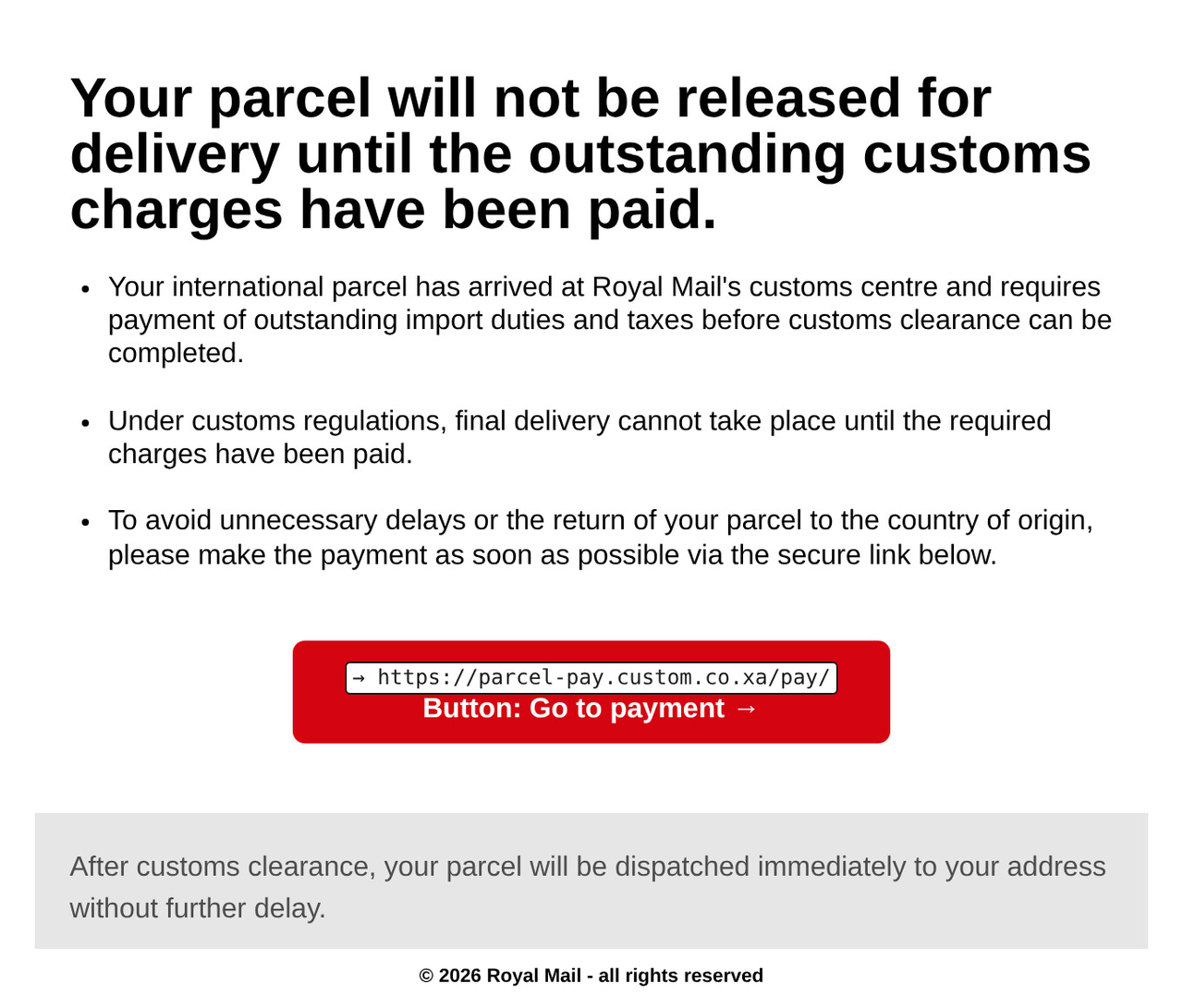
This is not hypothetical. Take a real parcel-delivery phishing email: it warns that a package is held until an outstanding customs charge is paid and offers a friendly “Go to payment” button whose label names no destination at all. Reveal URLs prints the button's true destination directly above it — → parcel-pay.custom.co.xa — so the address the friendly label hides is in plain sight. You can see where the button really leads, and you never had to click to find out.
How it works across platforms
Reveal URLs is a single idea delivered through whatever mechanism each platform allows. Underneath, every variant does the same thing: read the links, work out where they really go, and surface that destination — red when a link's visible text itself contains a URL or host for a different site than its real destination. Where that work happens differs by surface, so each is spelled out below.
- Browsers and Thunderbird (WebExtensions): on Chrome, Edge, Opera, Firefox, Safari, and Thunderbird, a content script post-processes the rendered DOM and prints each link's destination above it. These do all their work on your own device, transmitting nothing.
- Gmail: a Google Apps Script add-on presents each link's destination as a card in Gmail's sidebar. Because Gmail add-ons run on Google's own servers, the open message is read and analysed there (by Google, who already hold your mail), never by us and never by anyone else.
- Outlook: an Office.js add-in shows the analysis in a side panel. Its task-pane UI loads from Codeberg Pages over HTTPS, but the link analysis itself runs locally on the message in front of you — no email or message data is sent anywhere.
Reveal URLs ships with built-in support for the providers people are phished through most — Gmail, Outlook, and Proton Mail — and the host list is user-extensible from the options page, so you can add the webmail and sites you use. The interface is localized into many languages.
Seeing the real destination before you click
Privacy and no tracking
Where Reveal URLs does its work depends on the surface, and it is honest about the difference. The browser extensions and the Thunderbird add-on do all their work on your own device, transmitting nothing: nothing about the messages you read, the links you see, or the pages you visit ever leaves your machine. There are no analytics, no telemetry, and no tracking of any kind.
The Gmail add-on is the exception. Because Gmail add-ons run on Google's own servers, the open message is read and analysed there — by Google, who already hold your mail, never by us and never by anyone else.
Outlook sits in between: the add-in's user interface is served over HTTPS from Codeberg Pages (that is how Office add-ins are distributed), but the actual link analysis still runs locally on the message you are viewing, and no email or message data is sent anywhere. A security tool you cannot trust is worse than none, so Reveal URLs is precise about where each surface does its work rather than making one blanket promise.
Open source and license
Reveal URLs is free and open source, released under the AGPL-3.0-only license. The code is a TypeScript pnpm monorepo, and the project is © 2026 Jeroen Derks (Magentron). Because it is open source, you do not have to take any privacy claim on faith — you can read exactly what it does, build it yourself, and confirm for each surface where the analysis runs: on your own device for the browser extensions and Thunderbird, transmitting nothing.
The full source lives at codeberg.org/magentron/reveal-urls.
Install Reveal URLs
- Chrome Web Store (also for Brave, Opera, etc.)
- Microsoft Edge Add-ons
- Firefox Add-ons (AMO)
- Safari on the App Store
- Thunderbird Add-ons (ATN)
- the Gmail add-on on Google Workspace Marketplace
- the Outlook add-in on Microsoft AppSource
On Opera, install the Chrome build from the Chrome Web Store; a dedicated Opera listing is coming soon.
Project page: www.reveal-urls.eu · Source code: codeberg.org/magentron/reveal-urls
Reveal URLs is the practical, client-side answer to a problem we argued in depth in Email link phishing: why your email app should always show the URL: email authentication can prove who sent a message, but not where its links go. Until clients show the URL by default, this fills the gap — free, open source, and honest about where each surface does its work.
